
root
This is an old revision of the document!
Root and Superuser
Enabling root and superuser on Debian
- Click on Activities on the top left corner of the screen. You can also press the Windows key as a shortcut.

- Search for Settings and click on it.

- On the left pane, scroll down or search for Users and click on it.

- On the blue bar at the top of the page, click Unlock.

- Then, enter your user password as the Administrator's password. In my case, it is 1211112299. Once that is done, you should notice that the blue bar is gone.
- Now press Activities again, and search for Terminal. Click on it.

- Type
sudo whoamiand see the results.

The user megat is not in the sudoers file, we need to change that.

- Type
su rootto go into root.

Notice thatmegat@vboxchanged toroot@vbox.

- Type
sudo visudo /etc/sudoersto edit the sudoers file.

- Search for the line
# User privilege specification.

- Add the line
megat ALL=(ALL:ALL) ALL.
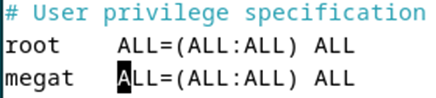
- Save the file using Ctrl + O → Enter → Ctrl + X.
- Type
exitto exit root.

- Type
sudo whoamiagain and see the difference.
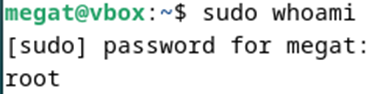


Congratulations, user megat now has sudo permissions!
root.1737173961.txt.gz · Last modified: 2025/01/18 04:19 by 1211112228