
This is an old revision of the document!
Add Sudoers without Sudo
Let's say you are have just freshly installed your new Linux OS on a brand new PC or VM. After you have setup the username and password etc, you encountered a problem when trying to install a new software. The problem is you could not use sudo.

Do not falter. Here is a guide on how to add yourself into sudoers:
1. Open terminal
2. Go to root by using command su root and enter the root password.

3. You will now be in root.

4. Enter command sudo visudo and press Enter

5. /etc/suoders.tmp file will be opened and this is how it will look like.
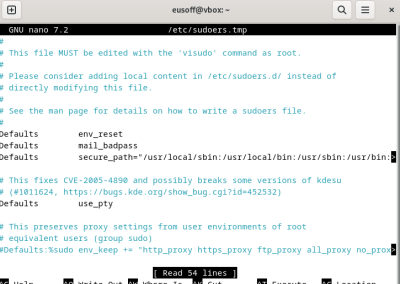
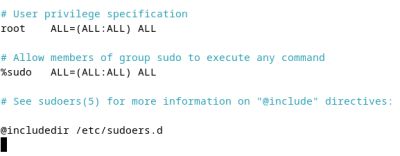
6. Scroll down until you see the #User Privilege Specification
 '
'
7. Add your username and add ALL=(ALL:ALL) ALL at the back. In my scenario:
eusoff ALL=(ALL:ALL) ALL

8. Once we have written everything, press Ctrl + X to save, when asked to save modified buffer, press Y and then Enter.

